A lead submits a form at 10:47 p.m. GoHighLevel captures the contact, adds the opportunity to a pipeline, and sends a standard SMS.
That workflow is useful but limited.
The message may say, “I’m interested in treatment for acne scars before my wedding,” “My AC stopped working and I need someone tomorrow,” or “Can someone explain the difference between your plans?” A fixed workflow may not understand the meaning, urgency, or appropriate next step.
Claude can help interpret that message, extract useful information, summarize the conversation, draft a response, and route the inquiry. GoHighLevel can continue handling the operational work: contacts, pipelines, calendars, consent, messaging, tasks, and workflows.
That is the basic idea behind a GoHighLevel Claude integration.
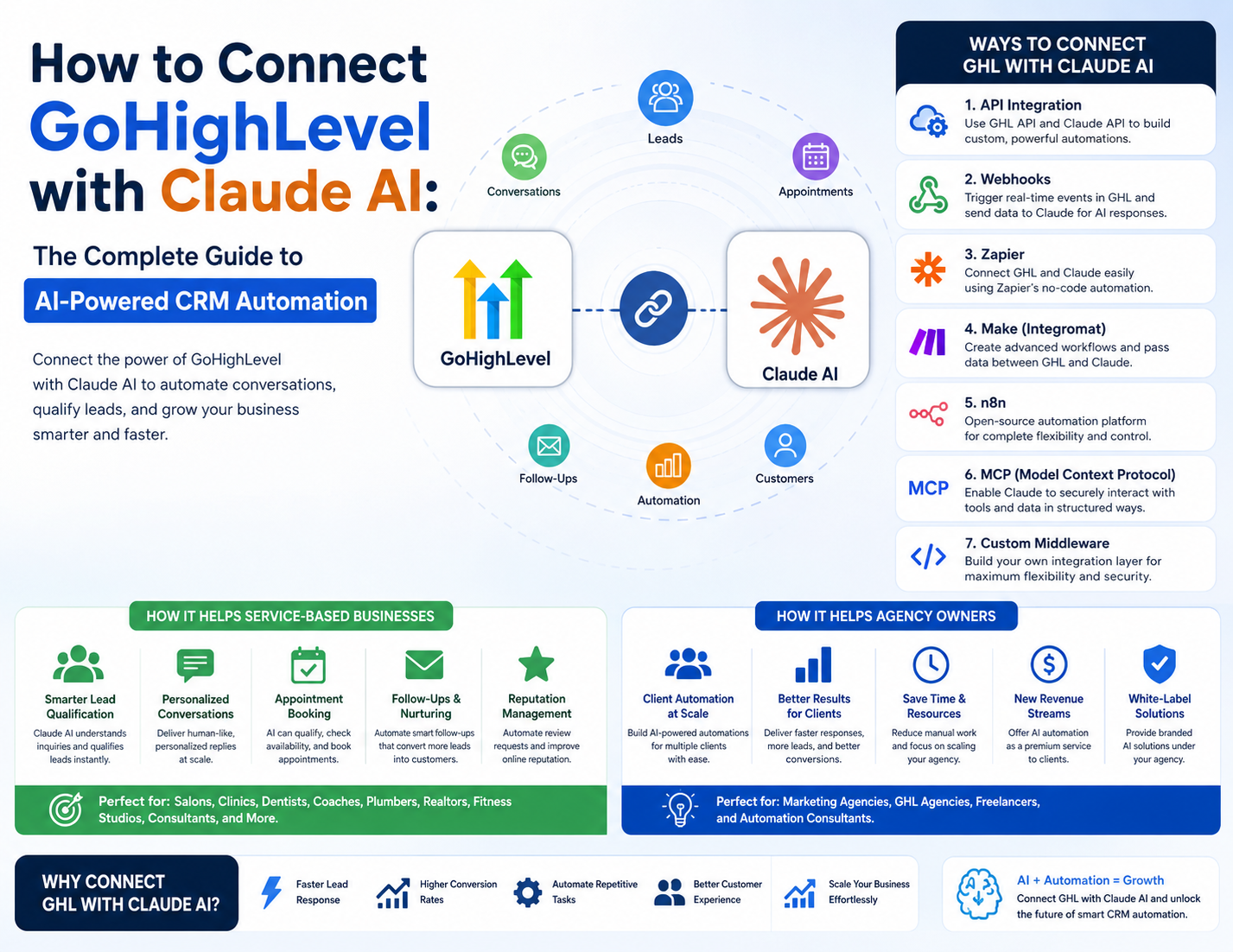
However, connecting the platforms is not the same as giving an AI unrestricted control of a CRM. There are several different approaches, official MCP, APIs, webhooks, Zapier, Make, n8n, and custom middleware and they differ significantly in capability, cost, security, and maintenance.
This guide explains how to connect GHL with Claude, what the combination can realistically automate, where it should not be used, and how to design a reliable system for local businesses, medical spas, service companies, freelancers, consultants, and agencies.
Research note: Product features, endpoints, scopes, pricing, and plan availability can change. The technical claims in this article are based primarily on official Anthropic and HighLevel documentation available on August 8, 2026. Always verify current documentation before deploying a production integration.
What Are GoHighLevel and Claude?
What GoHighLevel does?
GoHighLevel, also called HighLevel or GHL, combines CRM, marketing automation, communications, scheduling, sales pipeline management, and reputation tools.
A typical GHL account may contain:
-
Contacts and custom fields.
-
Tags, notes, tasks, and contact activity.
-
Opportunities and sales pipelines.
-
Forms and surveys.
-
Calendars and appointment settings.
-
SMS and email conversations.
-
Call records and missed-call workflows.
-
Websites, funnels, landing pages, and forms.
-
Automated campaigns and workflows.
-
Review and reputation-management features.
-
Payments, invoices, and subscriptions.
-
Reporting and agency sub-accounts.
The important distinction is that GHL is primarily a business operations platform. It stores customer records, receives events, applies workflow logic, and carries out actions.
For example, a dental practice might use GHL to:
-
Capture a website form.
-
Create or update a contact.
-
Add the person to a “New Patient” pipeline.
-
Send an SMS confirmation.
-
Wait one day.
-
Create a staff task if the person has not booked.
HighLevel provides a REST API for programmatic access to platform functionality, including CRM, contacts, conversations, calendars, opportunities, payments, and webhooks. Its developer documentation also describes OAuth 2.0 authorization and Private Integration Tokens.marketplace.gohighlevel+1
What Claude does
Claude is Anthropic’s AI assistant and model platform. It can be used in several ways:
-
As a conversational assistant in Claude’s applications.
-
Through the Claude API inside software.
-
Through tools exposed using MCP.
-
Through third-party automation platforms that call Anthropic services.
Claude is useful for language-heavy tasks such as:
-
Understanding a customer’s message.
-
Classifying intent.
-
Extracting information from unstructured text.
-
Summarizing long conversations.
-
Drafting personalized replies.
-
Comparing a conversation with business rules.
-
Producing structured output for another system.
Claude is not automatically a CRM, scheduling system, consent-management system, payment processor, or source of truth. It generates an output based on the instructions and context provided to it.
Anthropic’s Messages API is the core API pattern for sending prompts and context to a Claude model and receiving a response. API usage is generally priced according to the selected model and the amount of input and output processed, so current pricing should be checked before building an estimate.docs.anthropic+1
Claude as a chatbot versus Claude as an automation component
This distinction prevents many incorrect expectations.
Claude as a chatbot
You open Claude and ask:
“Summarize the last 20 leads in my pipeline.”
Claude can only access GHL information if a connection, tool, file, or integration gives it that information.
Claude as an API-powered component
A software system sends Claude:
-
The customer’s message.
-
Relevant contact fields.
-
The service catalog.
-
Business rules.
-
Conversation history.
-
Output requirements.
Claude returns:
{

  "intent": "consultation_request",

  "service": "acne_scar_consultation",

  "urgency": "normal",

  "needs_human_review": true,

  "suggested_next_action": "route_to_staff"

}
The middleware or automation platform then validates that result and tells GHL what to do.
In this model, Claude is one processing step inside a larger workflow—not the entire workflow.
What Does “Connecting GHL with Claude” Mean?
The conceptual architecture is:
Lead or customer

      ↓

GoHighLevel

      ↓

Trigger

      ↓

API, webhook, MCP, Zapier, Make, n8n, or middleware

      ↓

Claude

      ↓

AI output

      ↓

Validation and business rules

      ↓

GoHighLevel action

      ↓

Customer message, task, pipeline update, or staff escalation
The components explained simply
Trigger
A trigger is the event that starts the process.
Examples include:
-
New contact created.
-
Form submitted.
-
Inbound SMS received.
-
Missed call recorded.
-
Opportunity moved to a new stage.
-
Appointment requested.
-
Review received.
-
Contact inactive for a defined period.
Data transfer
The integration layer sends relevant information from GHL to Claude. That might happen through:
-
An API request.
-
An HTTP webhook.
-
An automation platform.
-
An MCP tool call.
-
A custom backend.
The data is usually represented as JSON, a common text format for passing structured information between systems.
Authentication
Authentication proves that the calling system is allowed to access the other system.
Examples include:
-
OAuth.
-
API keys.
-
Private Integration Tokens.
-
Bearer tokens.
-
Platform-managed credentials.
Authentication is not the same as authorization. Authentication identifies the connection; authorization determines what it may access or change.
Middleware
Middleware is the layer between GHL and Claude. It may be:
-
Zapier.
-
Make.
-
n8n.
-
A serverless function.
-
A Node.js or Python application.
-
An MCP server.
Middleware can retrieve additional context, remove unnecessary data, validate the output, apply business rules, and call GHL again.
Response handling
Claude’s output must be handled deliberately. A response might:
-
Update a custom field.
-
Add a tag.
-
Create a task.
-
Add an internal note.
-
Move an opportunity.
-
Draft an SMS.
-
Send an approved response.
-
Escalate to staff.
Claude generally does not “take over” a GHL account simply because an account is connected. The connection exposes particular tools, records, permissions, and actions. The available scope depends on the implementation and authorization.
Ways to Connect GoHighLevel with Claude
There is no single best method. The appropriate method depends on whether you want a personal assistant, a simple no-code workflow, a multi-client agency system, or a controlled production application.
Method comparison
Method 1: Direct API integration
An API is a structured way for one application to request data or actions from another.
A direct Claude API integration might work as follows:
-
GHL receives a new form submission.
-
A webhook calls your backend.
-
Your backend authenticates with GHL.
-
It retrieves the relevant contact and conversation.
-
It sends a minimal context package to Claude’s Messages API.
-
Claude returns a classification or draft.
-
Your backend validates the output.
-
It calls the GHL API to update the contact or create a task.
HighLevel provides API documentation for CRM and related resources, while Anthropic provides the Messages API reference for Claude requests.docs.anthropic+1
Use APIs when
-
You need precise control.
-
You are building for multiple clients.
-
You need custom validation.
-
You want a database or queue.
-
You need detailed audit logs.
-
You must separate AI suggestions from CRM actions.
-
You need to enforce complex permissions.
Main technical requirements
-
A secure server or serverless function.
-
HighLevel OAuth or a scoped Private Integration Token.
-
Anthropic API authentication.
-
Secure secret storage.
-
JSON parsing and validation.
-
Retry and timeout handling.
-
Duplicate-event protection.
-
Logging and monitoring.
This is usually the most maintainable option for a serious product, but it is not the fastest option for a nontechnical business owner.
Method 2: Webhooks
A webhook is an HTTP notification sent when something happens.
For example:
New GHL form submission

      ↓

Webhook POST request

      ↓

Make, n8n, Zapier, or custom endpoint

      ↓

Claude request

      ↓

GHL update
Webhooks are useful when the system should respond to an event rather than repeatedly check whether something changed.
Typical webhook data
A webhook payload may include:
-
Contact ID.
-
Location ID.
-
Event type.
-
Name.
-
Phone or email.
-
Form fields.
-
Message text.
-
Opportunity information.
-
Timestamp.
Do not assume every event includes every field. A reliable system should retrieve missing data from GHL when necessary and handle absent or changed fields gracefully.
Common webhook problems
-
The endpoint is not publicly reachable.
-
Authentication is missing or incorrect.
-
The payload shape differs from expectations.
-
Events arrive more than once.
-
The response takes too long.
-
The receiving platform rejects the request.
-
The workflow expects a field that was not sent.
Method 3: Zapier
Zapier is often the easiest option for nontechnical teams.
A conceptual Zap might be:
LeadConnector event

      ↓

Filter or formatter

      ↓

Anthropic Claude action

      ↓

LeadConnector update or message
Zapier’s official Claude documentation describes using the Anthropic app to send messages to Claude and perform related actions. Zapier notes that the Claude app requires an Anthropic account with API access and an API key.help.zapier
Good use cases
-
Summarizing a new lead.
-
Classifying a form response.
-
Drafting a follow-up.
-
Adding Claude’s summary to a GHL note.
-
Applying a tag based on a structured result.
-
Sending an internal notification.
Advantages
-
Fast setup.
-
Familiar visual interface.
-
Suitable for prototypes.
-
Useful for small volumes.
-
Minimal coding.
Limitations
-
Multi-step workflows can become expensive.
-
Complex loops and error handling may be difficult.
-
You must verify that the exact GHL trigger and action are available.
-
A third-party app connection does not necessarily mean an official native HighLevel-Claude integration.
-
Sensitive data passes through another service.
Use Zapier when the workflow is simple enough to explain in a few steps. If the automation requires queues, strict schemas, complex permissions, or high volume, consider Make, n8n, or custom middleware.
Method 4: Make
Make is a visual automation platform that is often more flexible than a basic Zapier workflow.
It can combine:
-
Webhooks.
-
HTTP requests.
-
Filters.
-
Routers.
-
Iterators.
-
Data transformation.
-
Claude or Anthropic modules.
-
GHL actions.
-
Error handlers.
Make documents webhooks as a way to trigger scenarios immediately when external applications send data. Make also documents an Anthropic Claude connector, but module availability and model options can change, so verify the current application documentation before designing a workflow.help.make+1
Good use cases
-
Lead scoring with multiple branches.
-
Different follow-ups for different service categories.
-
Conversation analysis followed by routing.
-
Multi-location reports.
-
Re-activation campaigns with eligibility rules.
-
Content generation followed by approval.
Limitations
-
Every operation can affect cost.
-
Scenarios can become difficult to audit.
-
A visually complex automation may be harder to maintain than a small application.
-
Sensitive data still passes through an external platform.
Method 5: n8n
n8n is a workflow automation platform with strong support for HTTP requests, webhooks, code steps, credentials, and AI-related nodes.
Its documentation describes:
-
Webhook nodes for receiving HTTP requests.
-
HTTP Request nodes for calling external APIs.
-
Anthropic nodes and credentials.
-
Custom requests when a built-in node does not provide the required operation.docs.n8n+1
Why technical users prefer n8n
-
More flexibility than many no-code tools.
-
Good support for custom API calls.
-
Self-hosting is possible.
-
Easier integration with databases and queues.
-
Suitable for reusable agency templates.
-
Supports complex branching and custom logic.
Self-hosting considerations
Self-hosting does not remove responsibility. You must manage:
-
Operating-system updates.
-
n8n updates.
-
Backups.
-
TLS certificates.
-
Network security.
-
Credential protection.
-
Monitoring.
-
Uptime.
-
Access control.
-
Incident response.
n8n can be a strong choice for a technical agency, but it may be excessive for a single salon needing a basic follow-up.
Method 6: MCP
MCP stands for Model Context Protocol. Anthropic describes MCP as a standardized way for AI applications to connect to external systems and use tools or resources.docs.anthropic
An MCP architecture might look like:
Claude

  ↓

MCP client

  ↓

MCP server

  ↓

HighLevel API or business-system tools

  ↓

GHL account
An MCP server exposes operations that an AI client can discover and invoke. The server may expose tools for searching contacts, reading conversations, creating tasks, or updating records.
How MCP differs from a normal API
An API is usually designed for software developers to call explicitly:
GET /contacts

POST /opportunities
MCP adds a standardized AI-facing layer. It can describe tools in a way that a compatible AI client can understand and use.
MCP does not mean:
-
Every GHL feature is automatically exposed.
-
Every action is safe.
-
Claude has unrestricted access.
-
No authentication is required.
-
No developer work is needed for custom tools.
-
Human approval is unnecessary.
Official HighLevel MCP support
HighLevel’s official documentation states that its LeadConnector MCP server is live and provides a Claude-specific endpoint:
https://services.leadconnectorhq.com/mcp/anthropic/v2The documentation describes connecting from Claude.ai using a custom connector and completing a LeadConnector authorization flow. It also documents OAuth and Private Integration Token options.marketplace.gohighlevel
HighLevel separately documents an MCP server endpoint at:
https://services.leadconnectorhq.com/mcp/The exact tools, scopes, authorization model, and supported clients depend on the endpoint and current documentation. Do not assume that a community tutorial using an older endpoint reflects the current official setup.
HighLevel has also published information about increased MCP scopes for Anthropic, with access spanning multiple operational domains. The available scope and operation catalog should be checked for the specific account and connection.help.gohighlevel
Use official MCP when
-
You want Claude to inspect or interact with GHL directly.
-
The official connector supports your required operation.
-
Your team is comfortable reviewing permissions.
-
You do not need a highly customized middleware layer.
-
You want to prototype AI-assisted CRM work.
Use caution when
-
Claude can perform write actions.
-
The workflow affects payments, public content, or customer communications.
-
Multiple clients or locations are involved.
-
You need deterministic approvals.
-
Sensitive customer data is included.
-
You need capabilities not exposed by the official server.
Method 7: Custom middleware
Custom middleware is a backend layer that sits between GHL and Claude.
It may handle:
-
OAuth token management.
-
Webhook verification.
-
Data minimization.
-
Prompt construction.
-
Structured output parsing.
-
Business rules.
-
Human approval.
-
Retry queues.
-
Rate limits.
-
Audit logs.
-
Multi-tenant separation.
-
GHL updates.
A robust design separates AI interpretation from business-critical action.
For example, Claude may recommend:
{

  "recommended_stage": "needs_human_followup",

  "confidence": 0.82,

  "reason": "Customer asked a treatment-specific question"

}
The middleware, not Claude alone, decides whether the stage may be changed.
What You Need Before Starting
Beginner setup
A beginner can start with:
-
A GHL account.
-
A Claude account or supported Anthropic access.
-
One simple use case.
-
A test contact.
-
One GHL workflow.
-
Zapier, Make, or the official MCP connection.
-
A clear prompt.
-
A human approval step.
Good beginner projects include conversation summaries and internal lead categorization.
Intermediate setup
An intermediate implementation may require:
-
GHL API or webhook access.
-
Anthropic API access.
-
An automation platform.
-
Custom fields and tags.
-
A pipeline structure.
-
Calendar and appointment rules.
-
Filters for consent and eligibility.
-
Error handling.
-
Basic JSON mapping.
-
Workflow logs.
-
Test cases.
Advanced setup
A production-grade system may require:
-
A backend or serverless architecture.
-
OAuth or scoped PIT management.
-
Secrets management.
-
Queues and retries.
-
Structured output validation.
-
Idempotency.
-
Monitoring and alerting.
-
Data-retention rules.
-
Multi-client isolation.
-
Prompt versioning.
-
Human approval queues.
-
Cost controls.
-
Security review.
-
Load testing.
Who needs coding?
You probably do not need coding for:
-
A basic MCP connection.
-
A simple Zapier workflow.
-
A simple Make scenario.
You probably need coding or technical implementation help for:
-
Direct API integrations.
-
Custom authentication.
-
Complex multi-client systems.
-
Strict data controls.
-
High-volume workflows.
-
Custom MCP servers.
-
Advanced n8n deployments.
-
Reliable production middleware.
Step-by-Step Conceptual Setup
The safest setup process is not “connect tools first.” It is to define the business process first.
1. Define one business problem
Avoid starting with:
“I want AI to automate my CRM.”
Start with:
“I want to classify new consultation inquiries and alert staff when the question is treatment-specific.”
That statement is testable.
2. Identify the GHL trigger
Choose one:
-
New form submission.
-
New inbound message.
-
Missed call.
-
Appointment request.
-
Opportunity stage change.
-
Inactive-contact condition.
3. Determine what Claude needs
Claude may need:
-
The message text.
-
Service category.
-
Business hours.
-
Customer’s location.
-
Previous conversation.
-
Existing pipeline stage.
-
Approved response rules.
It probably does not need:
-
The customer’s entire CRM record.
-
Unrelated notes.
-
Payment details.
-
Full health history.
-
Internal credentials.
-
Every conversation ever recorded.
4. Choose the connection method
Use:
-
Official MCP for direct Claude-assisted operations.
-
Zapier for simple visual workflows.
-
Make for branching scenarios.
-
n8n for technical flexibility.
-
API and middleware for maximum control.
5. Construct the prompt
Include role, context, rules, output format, and escalation conditions.
6. Receive the Claude response
Do not assume the response will always be valid. The model may return unexpected wording, missing values, or an incorrect classification.
7. Validate the output
Check:
-
Is the output valid JSON?
-
Is the category one of the allowed values?
-
Is the confidence present?
-
Is the requested action permitted?
-
Is a human review required?
-
Does the customer have consent to be contacted?
8. Apply business rules
For example:
If service = clinical_question:

    create staff task

    do not send AI-generated advice
If intent = booking_request and calendar information is complete:

    send approved booking link
If confidence < threshold:

    route to human
9. Update GHL
Possible actions include:
-
Add a tag.
-
Update a custom field.
-
Add an internal note.
-
Create a task.
-
Move an opportunity.
-
Send an approved message.
-
Add the contact to a campaign.
10. Log the event
Record:
-
Event ID.
-
Contact ID or internal reference.
-
Prompt version.
-
Output category.
-
Action taken.
-
Error status.
-
Human override.
Avoid logging unnecessary sensitive content.
11. Test edge cases
Test:
-
Empty messages.
-
Long messages.
-
Multiple questions.
-
Offensive messages.
-
Medical questions.
-
Ambiguous intent.
-
Duplicate webhooks.
-
Unsubscribed contacts.
-
Existing appointments.
-
Unknown service types.
-
API failures.
12. Deploy gradually
Start with internal summaries. Then move to suggested drafts. Only later consider automatic responses for narrow, low-risk cases.
Prompt Engineering for GHL and Claude
A weak prompt is:
Reply to this lead.
It does not explain the business, permitted claims, context, tone, escalation rules, or required output.
A stronger conceptual prompt is:
You are an intake-assistance system for a medical spa.
Your role is to classify inbound inquiries and draft administrative responses.

You are not a medical professional. Do not diagnose, recommend treatment,

determine eligibility, interpret symptoms, or provide individualized medical advice.
Business facts:

- The business offers consultations and approved services.

- Staff must answer treatment-specific questions.

- The business operates Monday through Saturday.

- Customers may book through the approved calendar link.
Customer message:

{{message}}
Relevant contact context:

- Name: {{first_name}}

- Previous inquiry category: {{previous_category}}

- Existing appointment: {{appointment_status}}
Return valid JSON with exactly these fields:

{

  "intent": "booking_request | pricing_question | treatment_question | general_question | other",

  "urgency": "low | normal | high",

  "draft_reply": "string",

  "needs_human_review": true,

  "reason_for_review": "string",

  "missing_information": ["string"]

}
Rules:

- If the customer asks for medical advice, set needs_human_review to true.

- Do not invent prices, availability, outcomes, or policies.

- If information is missing, ask one concise administrative question.

- Do not send the message; return a draft only.
The second prompt is more reliable because it defines:
-
Identity.
-
Scope.
-
Prohibited behavior.
-
Available context.
-
Business facts.
-
Output schema.
-
Escalation behavior.
-
Whether the model may act or only draft.
Prompt engineering does not eliminate errors. It makes the system easier to test and constrain.
Benefits of Connecting GHL with Claude
1. Lead qualification
Problem: Staff manually read every inquiry and decide where it belongs.
Solution: Claude classifies intent, service category, urgency, and missing information.
Example: A roofing lead mentions storm damage, a leaking ceiling, and an address. Claude extracts the location, urgency, and likely service type.
Limitation: A classification can be wrong. High-value or urgent leads should use human review.
2. Personalized follow-ups
Problem: Generic templates may feel irrelevant.
Solution: Claude drafts a response using the actual inquiry and approved business context.
Example: A consultant receives a message describing a specific operational problem. Claude drafts a reply referencing that problem rather than sending a generic “Thanks for reaching out.”
Limitation: The system must not invent capabilities, pricing, or promises.
3. Faster response times
Problem: A lead may wait while staff are unavailable.
Solution: GHL triggers an AI-assisted classification or approved reply.
Example: A salon can send an after-hours message that confirms the inquiry and provides an approved booking path.
Limitation: Speed is not enough if the response is incorrect or misleading.
4. Lead nurturing
Problem: Leads often need several follow-ups.
Solution: Claude creates context-aware drafts while GHL controls timing and consent.
Example: A real estate lead who asked about investment properties receives a relevant follow-up rather than a generic reminder.
Limitation: Relevance does not override opt-outs, frequency limits, or communication regulations.
5. Appointment assistance
Problem: Customers describe appointment needs in natural language.
Solution: Claude extracts service and timing preferences; GHL controls calendars and availability.
Example: “I need an HVAC inspection next week, preferably in the morning” becomes structured scheduling data.
Limitation: Claude should not override calendar rules or confirm an appointment that GHL has not actually booked.
6. Customer support
Problem: Messages arrive in inconsistent language.
Solution: Claude categorizes support questions and selects an approved response path.
Example: A customer message is classified as billing, scheduling, technical support, or staff escalation.
Limitation: Claude should not guess account status or policy details.
7. Conversation summarization
Problem: Staff waste time reading long threads.
Solution: Claude produces an internal summary, open questions, customer sentiment, and next step.
Example: Before a sales call, the representative sees a three-line summary of a 20-message exchange.
Limitation: Summaries can omit important details, so links to the original conversation should remain available.
8. CRM data enrichment
Problem: Free-text messages contain useful information that never reaches structured fields.
Solution: Claude extracts service type, urgency, location, timeline, or preferred contact method.
Example: A plumbing inquiry becomes structured data for dispatch.
Limitation: Extracted data should be marked as inferred or verified rather than treated as unquestionable fact.
9. Sales pipeline assistance
Problem: Opportunities stall without obvious visibility.
Solution: Claude summarizes inactivity and suggests internal next steps.
Example: It identifies opportunities with no reply after a proposal and creates a review task.
Limitation: A recommendation is not a sales decision.
10. Reactivation campaigns
Problem: Old leads receive irrelevant mass outreach.
Solution: Claude drafts messages based on previous interest, while GHL handles eligibility and campaign timing.
Example: Dormant consultation inquiries receive a message related to their original service interest.
Limitation: Customer consent, channel rules, and data accuracy remain the business’s responsibility.
11. Review and reputation workflows
Problem: Businesses need timely review responses.
Solution: Claude classifies sentiment and drafts a response.
Example: Positive reviews receive appreciation drafts; negative reviews create escalation tasks.
Limitation: Negative reviews often require a human response and should not be dismissed automatically.
12. Internal AI assistants
Problem: Owners and staff need answers buried in CRM records.
Solution: Claude searches authorized GHL information and summarizes it.
Example: “Which new leads are waiting for a response?” becomes an operational report.
Limitation: Tool permissions and data freshness determine what Claude can actually see.
13. Content generation
Problem: Agencies and businesses repeatedly create similar content.
Solution: Claude drafts email, SMS, FAQ, review, or campaign variations.
Limitation: Content still needs brand, legal, factual, and human review.
14. Reporting assistance
Problem: Basic reports may require interpretation.
Solution: Claude summarizes trends and creates management-ready explanations.
Limitation: Claude should not invent performance data. The source numbers must be supplied or retrieved reliably.
Disadvantages and Risks
Hallucinations
Claude may produce plausible but incorrect information. This is especially dangerous when it invents:
-
Prices.
-
Availability.
-
Policies.
-
Discounts.
-
Appointment confirmation.
-
Treatment claims.
-
Legal or financial advice.
Inconsistent outputs
Similar messages may receive different wording or classification. Structured outputs, allowed-value lists, validation, and examples reduce—but do not eliminate—this issue.
Cost
Total cost may include:
-
GHL subscription.
-
Claude or Anthropic API usage.
-
Automation-platform operations.
-
Hosting.
-
Developer time.
-
Monitoring.
-
Maintenance.
-
Data storage.
-
Support.
Anthropic pricing varies by model and usage. Zapier, Make, n8n, and GHL pricing also vary by plan and account configuration. Do not estimate a total from a single advertised plan.
Complexity
Each additional layer creates another place where an issue can occur:
GHL → webhook → automation platform → Claude → parser → GHLA problem in any layer may stop the process.
Privacy and security
Customer data may pass through multiple vendors. Businesses need to understand:
-
What information is transmitted.
-
Where it is processed.
-
How long it is retained.
-
Who can access it.
-
Whether the intended contract and configuration are appropriate.
-
Whether the use is suitable for the business’s legal and regulatory context.
Incorrect CRM updates
An incorrect AI classification could:
-
Move a deal to the wrong stage.
-
Trigger an inappropriate campaign.
-
Create duplicate tasks.
-
Send an unsuitable message.
-
Mark a lead as unqualified.
-
Overlook an urgent inquiry.
Latency and failure
An API may be slow or unavailable. A webhook may fail. An automation run may time out. A customer should not be left waiting simply because the AI step failed.
Vendor dependency
An integration may depend on:
-
GHL API changes.
-
Anthropic model changes.
-
Zapier or Make module changes.
-
n8n updates.
-
MCP endpoint changes.
-
Pricing changes.
-
Scope changes.
Human oversight
Human review is necessary whenever:
-
The message concerns medical or legal judgment.
-
The action is irreversible.
-
The customer is angry or distressed.
-
The AI is uncertain.
-
The value of the opportunity is high.
-
The business’s reputation is at stake.
-
A policy exception is requested.
When Not to Use Claude
Use traditional GHL automation when:
-
The rule is deterministic.
-
The message never changes.
-
A simple if/then condition is sufficient.
-
The task involves unsubscribe logic.
-
The task involves appointment timing.
-
The task involves payment processing.
-
The task must run identically every time.
-
The cost of an AI call is not justified.
-
A mistake would be expensive.
-
No language interpretation is required.
Examples:
-
Sending an appointment reminder 24 hours before a booking.
-
Applying a tag when a form checkbox is selected.
-
Adding a task when an opportunity enters a pipeline stage.
-
Sending an opt-out confirmation.
-
Waiting three days before sending a fixed follow-up.
-
Updating a field when a payment is recorded.
Technically, Claude could be added to many of these workflows. That does not make it a better design.
GHL Workflow Versus Claude Versus Both
Medical Spa Use Cases
A medical spa can use GHL, Claude, and human staff together for administrative workflows.
Lead qualification
Claude may classify:
-
New consultation request.
-
Pricing question.
-
Scheduling inquiry.
-
Existing-client question.
-
General information.
-
Treatment-specific question requiring staff.
It should not determine whether a person is medically suitable for a procedure.
Consultation requests
A form might include:
“I’m interested in learning about options before my wedding.”
Claude can extract:
-
General consultation intent.
-
Desired timeline.
-
Preferred contact method.
-
Need for staff follow-up.
GHL can then create an opportunity and task.
Treatment inquiries
A customer may ask whether a procedure is appropriate for a condition. That should be routed to qualified staff. Claude may send a neutral acknowledgment such as:
“Thank you for your question. A qualified member of our team will review this and contact you.”
It should not diagnose, recommend treatment, interpret symptoms, or determine eligibility.
Missed-call follow-up
GHL can identify a missed call. Claude may create an appropriate administrative draft based on whether the caller is a new lead or existing client.
Appointment reminders
GHL should remain responsible for appointment timing, calendar records, confirmations, and reminders. Claude may help create approved wording, but it should not invent appointment details.
Lead nurturing and reactivation
Claude can draft non-clinical messages based on prior inquiry category, provided that communication consent and business rules are respected.
FAQ routing
Appropriate FAQs may include:
-
Location.
-
Parking.
-
Hours.
-
Consultation process.
-
Booking link.
-
General administrative policies.
Treatment-specific questions should go to staff.
Review requests
GHL can trigger a request after a completed appointment. Claude may personalize the message or classify incoming review sentiment.
Staff notifications and summaries
Claude can summarize conversations and create internal notes. Staff should retain access to the original thread.
Privacy and compliance caution
Do not casually claim that a GHL-Claude setup is HIPAA compliant. Compliance depends on the complete architecture, vendors, contracts, configuration, access controls, retention practices, and applicable law.
A medical business should assess:
-
Whether sensitive information is being sent.
-
Whether the vendors’ terms and contractual arrangements are appropriate.
-
Whether data minimization is possible.
-
Whether the workflow requires human review.
-
Whether the business has documented access and retention policies.
Service-Based Business Examples
Freelancer Opportunities
Freelancers can use this skill to build:
-
Lead qualification systems.
-
Missed-call workflows.
-
AI-assisted intake processes.
-
Conversation summaries.
-
CRM cleanup and enrichment.
-
Appointment routing.
-
Review-response workflows.
-
Client reporting assistants.
-
Niche-specific templates.
-
AI-powered GHL snapshots.
A realistic service package might include:
Starter implementation
-
One business problem.
-
One GHL workflow.
-
One Claude prompt.
-
One approval path.
-
Basic testing.
-
Documentation.
Growth implementation
-
Multiple workflows.
-
Custom fields and pipeline updates.
-
Webhooks or Make/n8n.
-
Structured outputs.
-
Error handling.
-
Reporting.
Ongoing optimization
-
Prompt revisions.
-
Failure monitoring.
-
Cost review.
-
New use cases.
-
Workflow maintenance.
-
Staff training.
Avoid promising guaranteed revenue or “fully autonomous” operations. The value is in solving a defined process reliably.
Agency Use Cases
Agencies can productize:
-
AI lead qualification.
-
Missed-call response.
-
Lead reactivation.
-
AI-assisted receptionist workflows.
-
Conversation summaries.
-
Client reporting.
-
Appointment inquiry routing.
-
Review triage.
-
Internal CRM assistants.
-
Service-specific intake.
Agency operating model
-
Create a standard operating procedure.
-
Define the supported GHL fields and pipeline stages.
-
Create a prompt template with client-specific variables.
-
Use isolated credentials for each client.
-
Test with synthetic and real approved scenarios.
-
Add client-specific approval rules.
-
Monitor failures and costs.
-
Document what the system may and may not do.
-
Review performance with the client.
-
Charge for maintenance, not just installation.
HighLevel’s sub-account structure can be useful for agencies, but each client’s authorization, data, and workflow logic should be treated as separate.
Ten Realistic Workflow Architectures
Workflow 1: AI lead qualification
Trigger: New form submission.
Data sent to Claude: Name, message, service selected, location, consent status.
Claude’s job: Classify intent, urgency, service category, and missing information.
Expected output: Structured JSON with allowed categories.
Business rules: No customer-facing response if the inquiry is sensitive or confidence is low.
GHL action: Update custom fields, apply a tag, create a task, or move the opportunity.
Human handoff: Staff review high-value or ambiguous leads.
Potential failure: The form field is missing or the service category is misclassified.
How to improve it: Use allowed values, examples, validation, and a fallback category.
Workflow 2: Missed-call follow-up
Trigger: GHL records a missed call.
Data sent to Claude: Caller identity, previous contact status, recent conversation, business hours.
Claude’s job: Draft an appropriate callback message.
Expected output: A short message plus a suggested routing category.
Business rules: Do not send if the contact opted out or if the number is blocked.
GHL action: Send an approved SMS or create a callback task.
Human handoff: Staff handle angry, urgent, or existing-client issues.
Potential failure: Duplicate call events generate multiple messages.
How to improve it: Use event IDs and idempotency checks.
Workflow 3: Website form analysis
Trigger: Form submission with a long free-text message.
Data sent to Claude: Message, selected services, location, preferred timeline.
Claude’s job: Extract structured requirements and unanswered questions.
Expected output: Service, timeline, location, urgency, missing information.
Business rules: Do not infer facts that were not stated.
GHL action: Add fields and create a sales task.
Human handoff: Staff verify extracted details before quoting.
Potential failure: Claude treats an assumption as a fact.
How to improve it: Include an evidence field containing the source phrase.
Workflow 4: Appointment inquiry
Trigger: Customer asks to book.
Data sent to Claude: Message, service catalog, approved booking paths.
Claude’s job: Identify service and requested timing.
Expected output: Booking intent, service, preferred dates, missing information.
Business rules: GHL calendar availability controls actual booking.
GHL action: Send an approved booking link or create a scheduling task.
Human handoff: Staff handle unusual requests.
Potential failure: Claude suggests a time that is not available.
How to improve it: Never treat generated availability as authoritative.
Workflow 5: Dormant lead reactivation
Trigger: Contact has no activity for a defined period.
Data sent to Claude: Previous inquiry category, last interaction summary, consent status, current offer rules.
Claude’s job: Draft a relevant reactivation message.
Expected output: One message and a reason for relevance.
Business rules: Exclude unsubscribed, converted, or restricted contacts.
GHL action: Add eligible contacts to an approval campaign.
Human handoff: Review the first batch before activation.
Potential failure: The message references outdated information.
How to improve it: Send only current, verified context.
Workflow 6: Conversation summarization
Trigger: Opportunity moves to a sales stage or staff requests a summary.
Data sent to Claude: Recent conversation only.
Claude’s job: Summarize goals, objections, open questions, and next step.
Expected output: Internal note with date and prompt version.
Business rules: Do not treat the summary as a verbatim record.
GHL action: Add an internal note.
Human handoff: Salesperson checks the original conversation.
Potential failure: A key detail is omitted.
How to improve it: Require a list of unresolved questions and source excerpts.
Workflow 7: Customer support routing
Trigger: New inbound message.
Data sent to Claude: Message, customer type, approved categories, recent relevant history.
Claude’s job: Categorize billing, scheduling, technical, general, or escalation.
Expected output: Category, confidence, draft response, escalation flag.
Business rules: No answer outside approved knowledge.
GHL action: Route to a team, create a task, or send an approved answer.
Human handoff: Any complaint, dispute, or sensitive issue.
Potential failure: Claude selects the wrong department.
How to improve it: Maintain a clear routing taxonomy and confidence threshold.
Workflow 8: Review and reputation workflow
Trigger: New review or feedback event.
Data sent to Claude: Rating, text, business response policy.
Claude’s job: Classify sentiment and draft a response.
Expected output: Sentiment, urgency, response draft, escalation flag.
Business rules: Negative or threatening content requires human review.
GHL action: Add a task, notify staff, or request approval.
Human handoff: Required for negative reviews.
Potential failure: The response sounds defensive or reveals private details.
How to improve it: Use approved response patterns and privacy rules.
Workflow 9: Sales opportunity prioritization
Trigger: Daily scheduled review.
Data sent to Claude: Opportunities with recent activity, stage, value range, and last contact date.
Claude’s job: Summarize risk and suggest follow-up priority.
Expected output: Priority, reason, recommended internal action.
Business rules: Claude recommends; the sales manager decides.
GHL action: Create tasks or add internal notes.
Human handoff: Manager reviews the prioritized list.
Potential failure: The system prioritizes noisy or incomplete data.
How to improve it: Combine AI output with deterministic factors such as age, stage, and consent.
Workflow 10: Internal AI assistant
Trigger: Staff asks a question in Claude or an internal interface.
Data sent to Claude: Authorized GHL records relevant to the request.
Claude’s job: Answer using retrieved data and identify uncertainty.
Expected output: Concise answer with record references or dates.
Business rules: No access outside the user’s authorized location or role.
GHL action: Optional task, note, or report creation.
Human handoff: Staff verify important results.
Potential failure: Claude presents stale data as current.
How to improve it: Include retrieval timestamps and require “not found” responses.
Security and Privacy
Protect API keys
Never place API keys in:
-
Front-end JavaScript.
-
Public GitHub repositories.
-
Browser local storage.
-
Customer-visible forms.
-
Shared screenshots.
-
Public automation templates.
Use environment variables, managed credentials, or a secrets-management system.
Authentication and authorization
Use the narrowest available permission set. A connection that only needs to read contacts should not automatically receive permission to send messages, change pipelines, or access payments.
HighLevel documents Private Integration Tokens as scoped credentials for server-to-server access and provides authorization documentation for access control.marketplace.gohighlevel+1
Data minimization
Send only what Claude needs.
For lead qualification, this may be:
-
First name.
-
Inquiry text.
-
Service selected.
-
City.
-
Consent status.
It may not require:
-
Full address.
-
Payment data.
-
Complete medical history.
-
Unrelated internal notes.
-
Entire conversation history.
Logging
Useful logs include:
-
Event ID.
-
Workflow name.
-
Timestamp.
-
Connection or sub-account identifier.
-
Prompt version.
-
Output status.
-
Action status.
-
Error type.
-
Human override.
Do not automatically log every sensitive message forever.
Third-party platforms
Zapier, Make, n8n hosting, API providers, and middleware all become part of the data path. Before handling sensitive information, review:
-
Terms.
-
Privacy documentation.
-
Retention practices.
-
Regional processing information.
-
Access controls.
-
Contractual requirements.
-
Required agreements.
-
Business and legal obligations.
For healthcare-related workflows, compliance cannot be inferred from the fact that a tool is popular or that it connects through an API.
Human review and audit trails
If the AI creates or recommends a significant action, retain enough information to explain:
-
What triggered the action.
-
What data was supplied.
-
Which prompt version was used.
-
What Claude returned.
-
Which rule allowed the action.
-
Whether a person approved or changed it.
Cost Considerations
Do not calculate integration cost from the Claude API price alone.
Possible cost categories
-
HighLevel subscription and relevant features.
-
Claude subscription or Anthropic API usage.
-
Zapier plan and task usage.
-
Make plan and operation usage.
-
n8n cloud or infrastructure.
-
Serverless functions or backend hosting.
-
Database or queue.
-
Monitoring and alerting.
-
Development.
-
Testing.
-
Maintenance.
-
Security review.
-
Staff training.
What affects total cost?
-
Number of leads.
-
Number of AI calls.
-
Prompt length.
-
Conversation-history length.
-
Model selected.
-
Output size.
-
Number of workflows.
-
Number of locations.
-
Number of clients.
-
Automation-platform operations.
-
Retry volume.
-
Hosting architecture.
-
Logging and monitoring requirements.
A cost-conscious design does not send every message to Claude. It uses GHL filters to determine which events need AI.
Troubleshooting Guide
Twenty-Five Best Practices
-
Start with one narrow workflow.
-
Define a measurable business outcome.
-
Use GHL for deterministic rules.
-
Use Claude only where language understanding adds value.
-
Minimize the data sent to Claude.
-
Use structured outputs.
-
Validate every AI response.
-
Restrict outputs to allowed categories.
-
Add human escalation.
-
Never let customer text redefine system instructions.
-
Protect credentials with secrets management.
-
Use least-privilege permissions.
-
Separate test and production accounts.
-
Build duplicate-event protection.
-
Add retries with limits.
-
Create a fallback path when AI fails.
-
Version prompts.
-
Log workflow and action status.
-
Monitor AI and automation costs.
-
Test long, empty, ambiguous, and hostile inputs.
-
Keep original customer conversations accessible.
-
Do not let Claude invent pricing or availability.
-
Require GHL to confirm actual bookings.
-
Document every automated action.
-
Review performance periodically.
-
Train staff on escalation procedures.
-
Isolate client credentials in agency systems.
-
Review third-party vendor terms before sensitive use.
-
Avoid automatic actions that are difficult to reverse.
-
Remove unused integrations and credentials.
Advanced Architecture
A production-oriented system may look like this:
GoHighLevel

    ↓

Webhook receiver

    ↓

Authentication and event verification

    ↓

Data minimization

    ↓

Queue or workflow platform

    ↓

Claude request

    ↓

Structured-output validation

    ↓

Business rules engine

    ↓

Human approval when required

    ↓

GoHighLevel API action

    ↓

GHL workflow, pipeline, task, or message

    ↓

Audit log and monitoring
The important architectural principle is separation:
-
GHL manages records and operational workflows.
-
Claude interprets language and drafts or classifies.
-
Middleware validates output and enforces rules.
-
Human staff handle ambiguity and sensitive decisions.
-
Monitoring detects failures and cost problems.
This is safer than allowing a model to generate unrestricted instructions that directly change CRM records.
Measuring Success
Track operational metrics, not just AI activity.
Useful KPIs include:
-
Lead response time.
-
Lead-to-appointment conversion.
-
Appointment booking rate.
-
Appointment show rate.
-
Reactivation rate.
-
Qualified-lead percentage.
-
Human escalation rate.
-
AI correction rate.
-
Workflow failure rate.
-
Duplicate-message rate.
-
Cost per AI-assisted interaction.
-
Customer satisfaction.
-
Time saved per staff member.
-
Revenue influenced by the workflow.
Avoid vanity metrics such as:
-
Number of prompts generated.
-
Number of AI calls.
-
Number of automated messages.
-
Number of fields updated.
More automation is not automatically better. A workflow that sends many incorrect messages is worse than a smaller workflow that staff trust.
Frequently Asked Questions
Can Claude connect directly to GoHighLevel?
Yes, HighLevel currently documents an official LeadConnector MCP server with a Claude-specific endpoint and OAuth-based connection flow. This is distinct from a traditional native app integration.marketplace.gohighlevel
What is the easiest way to connect Claude and GHL?
For direct Claude-assisted CRM work, the official HighLevel MCP connector may be the simplest current option. For a basic event-driven automation, Zapier or Make may be easier.
Do I need coding knowledge?
Not necessarily. MCP, Zapier, and Make can support low-code setups. Direct API integrations, custom middleware, advanced n8n workflows, and multi-client systems typically require technical skills.
Can I use Zapier?
Yes. Zapier documents an Anthropic Claude app that can send messages to Claude and perform related actions. Zapier states that API access and an API key are required.help.zapier
Can I use Make?
Yes. Make supports webhooks and Anthropic Claude modules. Verify the current module capabilities and plan limits before deployment.help.make+1
Can I use n8n?
Yes. n8n provides webhook, HTTP Request, and Anthropic-related capabilities. Its documentation also recommends HTTP Request when a built-in node does not support the required operation.docs.n8n+1
What is MCP?
MCP is the Model Context Protocol, a standardized method for connecting AI applications with external tools and data sources. Anthropic maintains the official MCP documentation.docs.anthropic
Can MCP connect Claude to GHL?
Yes. HighLevel documents an official MCP server and Claude endpoint. The tools and permissions available depend on the endpoint, account, authorization flow, and scopes.marketplace.gohighlevel
Is MCP the same as an API?
No. An API is a direct application interface. MCP is a standardized AI-facing protocol for discovering and using tools or resources. An MCP server may call an API behind the scenes.
Can Claude send SMS through GHL?
It may be able to do so when the authorized connection exposes the required HighLevel conversation or messaging operation. Do not assume access is available for every account or connector. For production use, require message-policy checks, opt-out checks, and human approval where appropriate.
Can Claude qualify leads?
Yes. It can classify natural-language inquiries and extract fields. Classification should be validated, and important leads should have a human review path.
Can Claude book appointments?
Claude may help interpret an appointment request, but GHL should remain authoritative for calendar availability, booking confirmation, and appointment records.
Can Claude update CRM records?
It may be able to update records through the official MCP server, GHL API, or automation platform when the connection has the necessary scope and action. Write permissions should be limited and tested.
Can medical spas use Claude with GHL?
Yes, for administrative workflows such as routing, summaries, approved FAQs, reminders, and review management. It should not diagnose, recommend treatment, or determine clinical eligibility.
Is a GHL-Claude system HIPAA compliant?
Do not assume so. Compliance depends on the entire system, vendors, contracts, configurations, data flows, retention, access controls, and applicable requirements.
How much does it cost?
The total depends on GHL, Claude or Anthropic API usage, automation operations, hosting, development, monitoring, and maintenance. Anthropic’s official pricing page should be checked for current model rates.docs.anthropic
Is Claude better than other AI models for GHL?
There is no universal answer. Model selection depends on accuracy, latency, output quality, tool compatibility, cost, privacy requirements, and workflow complexity. Test representative business data rather than relying on general claims.
Should every GHL workflow use AI?
No. Deterministic GHL workflows are usually better for reminders, tags, consent, timing, payments, and simple if/then logic.
Can a freelancer sell this service?
Yes. Freelancers can provide implementation, templates, prompt design, testing, integrations, monitoring, and maintenance. They should define scope and support responsibilities clearly.
Can agencies white-label the system?
Agencies can productize and white-label their implementation services, subject to the terms of the relevant vendors and their client agreements. Each client should have appropriate data isolation, permissions, and documentation.
Is an API always required?
No. Official MCP and some no-code tools can handle the connection without you directly writing API requests. API access is still involved somewhere in many integrations, even if the platform hides it.
What happens if Claude is unavailable?
The workflow should fall back to a traditional GHL message, create a staff task, or pause safely. It should not silently perform an unverified action.
Can Claude read all GHL data after connection?
No. Access depends on the connector, selected account, scopes, exposed tools, and authorization. A connection should be treated as permissioned access, not unlimited access.
Can I use a community-built GHL MCP server?
Possibly, but it is not the same as using HighLevel’s official server. Review the source, hosting, credentials, security model, maintenance status, and data path before using one with real customer information.
Final Decision Guide
You probably need GHL + Claude if:
-
Your leads send unstructured messages.
-
Staff spend time reading and summarizing conversations.
-
You need personalized drafts at scale.
-
You want AI-assisted qualification or routing.
-
Your business has clear escalation rules.
-
You can monitor and improve the workflow.
You probably only need GHL if:
-
The task is predictable.
-
Fixed templates are sufficient.
-
Timing and consent are the main requirements.
-
You do not need language interpretation.
-
The AI cost is not justified.
-
Mistakes would be difficult to reverse.
You probably need custom development if:
-
You serve multiple clients or locations.
-
You need strict permission controls.
-
You require detailed audit logs.
-
You process high volumes.
-
You need custom MCP tools.
-
You need queues, retries, validation, and approval systems.
-
You want to build a product rather than a one-off automation.
You should involve a developer if:
-
You are handling sensitive information.
-
You need direct APIs.
-
You need public-facing automated responses.
-
You need write access to CRM records.
-
You need custom authentication.
-
You need high reliability or multi-tenant architecture.
You should involve human staff if:
-
The inquiry is medical, legal, financial, or emotionally sensitive.
-
The customer is angry or confused.
-
The requested action is irreversible.
-
The AI is uncertain.
-
The opportunity is high value.
-
The answer requires professional judgment.
The practical answer to “how to connect GHL with Claude” is not simply to add an API key or paste an MCP URL. It is to select the smallest safe architecture that solves a defined business problem.
Claude adds the most value where customer language is messy, context matters, and staff are spending time interpreting or drafting. GHL remains the better tool for predictable workflows, scheduling, consent, pipeline operations, and recordkeeping.
Use AI to improve judgment-heavy preparation—not to remove judgment where it is still required.